
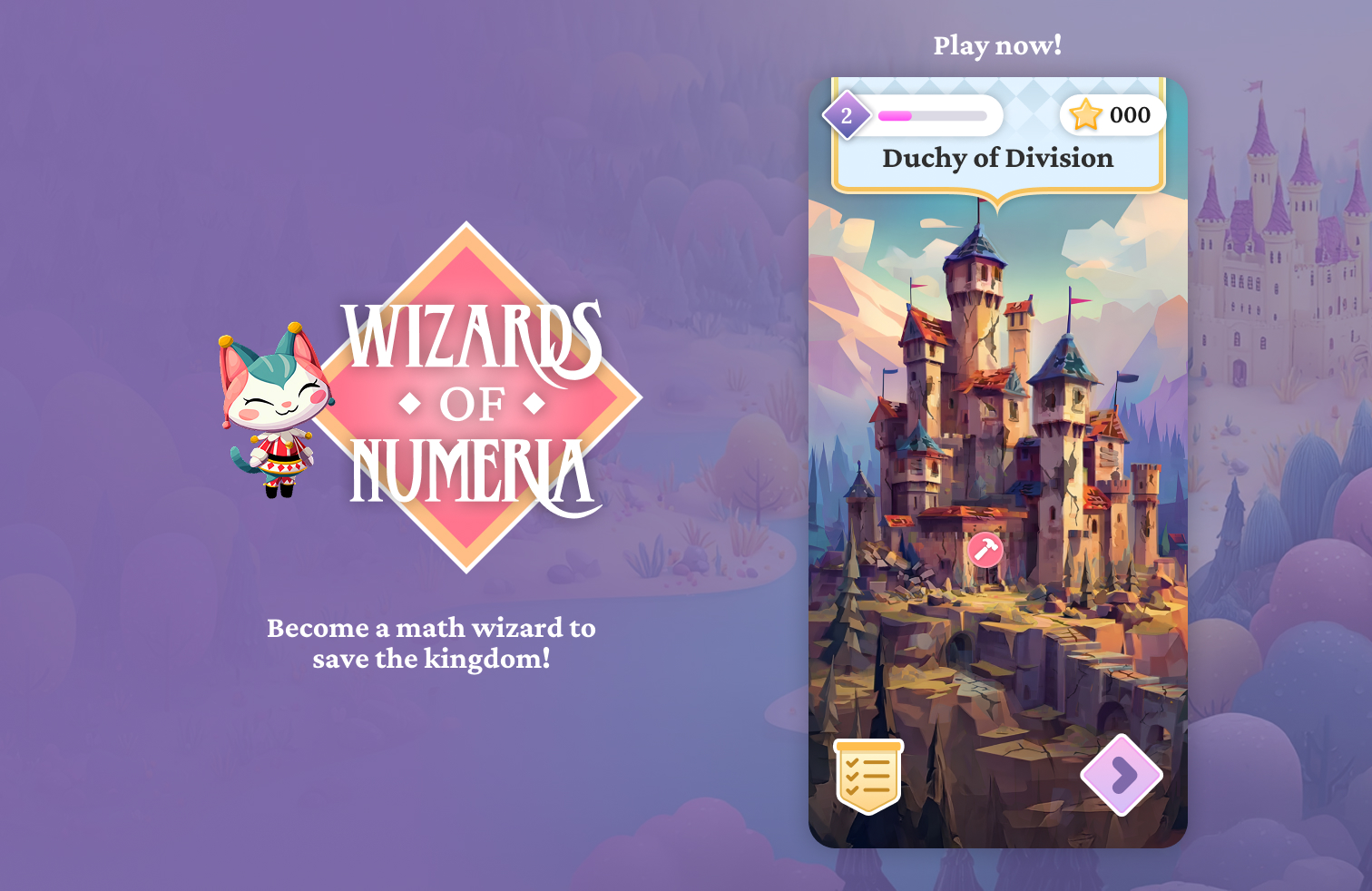


WIZARDS OF NUMERIA
Building a Kids Math Game in One Week
My Role
Product Designer
Engineer
Tools
Claude Code
Rive
Figma
Midjourney
Timeframe
Prototype: 2 hours
Release: 1 week
How do you make math fun for kids?
As a parent watching my own child struggle with math homework—tears, frustration, refusal—I evaluated every educational app on the market. I saw an opportunity to create an experience optimized for our specific needs: adaptive difficulty tailored to individual progress, game mechanics that feel like play rather than practice, and a parent-friendly approach to monetization.
So I built a new solution in one week, using AI tools to move from concept to working prototype at a speed impossible with traditional development.
The Result
In one week, I shipped a working game that transformed math from daily battle to requested activity:
- 50+ problems completed voluntarily in the first month (previously: fights over 10-minute homework sessions)
- 18-minute average session time 3x longer than typical educational app engagement
- Zero parent nagging required
Play It Yourself

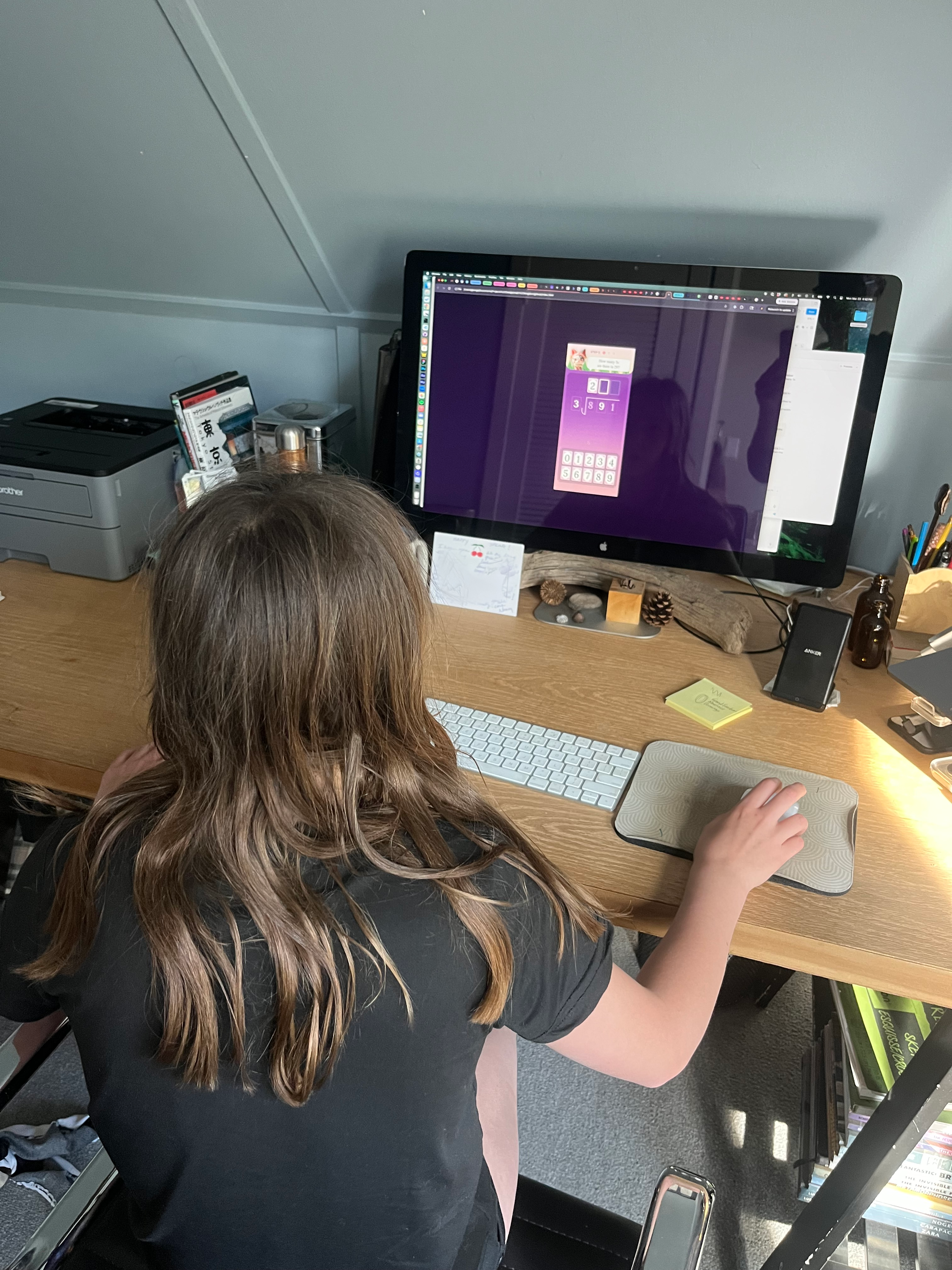
My Role: Solo Designer-Developer
I handled end-to-end product development—research, design, animation, and development—leveraging AI tools to compress what would typically be a 3-month, multi-person effort into a one-week solo sprint.
Tool Stack:
- Design & Iteration: Figma (interface design) + Figma MCP (rapid prototyping with Claude)
- Development: Claude Code (from planning to production code)
- Visual Assets: Midjourney (concepting) → Recraft (vectorization)
- Animation: Rive (interactive character & UI animations)
While I've shipped products with engineering teams for years, this was my first time writing production code—proving that AI tools have fundamentally changed what individual designers can accomplish.
Design principles that guided every decision
Through observing my own kid and analyzing competitor apps, I identified four non-negotiables:
Positive Reinforcement Over Penalties
Math anxiety is real. Every interaction needed to feel supportive, not punitive. I chose to break down complex problems into smaller, easy-to-digest stages with praise at every step.
Parent-Friendly Monetization
No predatory IAPs or chat features. Designed for a subscription model parents could trust. When parents trust the educational value, they grant longer play sessions and encourage daily use—I designed for trust from day one.
AI-Powered Adaptive Difficulty
Unlike static apps, I wanted the game to adapt to each child’s skill level based on how they were performing. I built a custom Claude Code Skill that tracks player success rates and dynamically adjusts problem difficulty in real-time.
Fun First
If it felt like homework, I'd failed. So I applied game development principles: tight feedback loops, celebration moments, and smooth animations that make every tap feel responsive and rewarding.
The Solution
I selected the setting of a medieval magical kingdom because I knew it had broad appeal with kids from countless successful books and films - and I also thought it offered great opportunities for fun magical moments.
To create the supportive environment kids need, I flipped the traditional education dynamic: instead of being students who "don't know enough," players become math wizards teaching a kingdom that's forgotten its skills. This role reversal transforms math from a subject they're struggling with into knowledge they proudly share.
The repair mechanic (inspired by games like Gardenscapes) made learning progress visually concrete—every solved problem restored part of the castle, turning abstract math practice into tangible accomplishment.
To make difficulty truly adaptive, I designed a system where Claude Code dynamically generates multi-step problems based on the child's performance—breaking complex division into manageable chunks and increasing complexity when they're ready for a challenge.
Bringing it to life
The power of characters
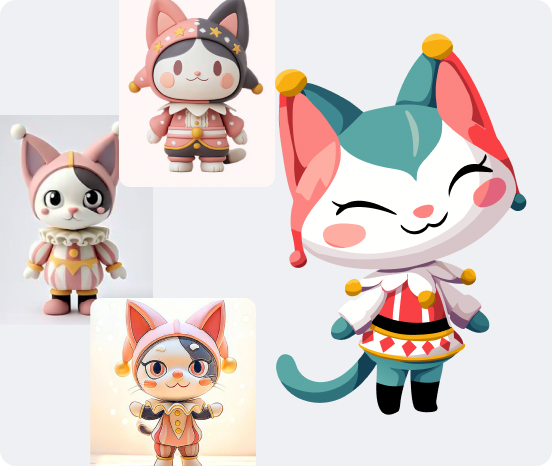
I knew I wanted an animated host character to provide an emotional connection. I started with Japanese collectible figure aesthetics—approachable, cute, with personality that reads clearly at small sizes. And I chose a cat because of their clever nature and broad appeal - with a jester costume to fit into the medieval theme and for added cuteness.
For initial ideation, I used Midjourney to rapidly explore concepts, and after many variations I arrived at a character design that I really liked. I even generated some initial animations of the character. Testing revealed the dark, rendered style clashed with the bright, playful UI—kids respond better to high-contrast, cheerful palettes. This insight drove the pivot to vector style.
This led me to explore a more vector style, which had the benefit of smaller file sizes and could be created with transparent backgrounds - something Midjourney didn’t support. First, I modified the character in Midjourney to adjust the style, then I vectorized the tool in Recraft, which had the best vectorization capability that I tested.
I designed for accessibility from the start: high-contrast colors, large touch targets (60px minimum), and audio cues for correct answers to support diverse learning needs.
Animation
Now it was time to animate the UI and the character. Many of the AI-based animation tools on the market only output video, which wouldn’t work for my purposes since I wanted lightweight javascript-based animations.
That led me to evaluate Jitter, Lottie and Rive. I ended up choosing Rive because of its ease of use and support for interactive animations—giving me the potential for the cat to respond to touch, creating moments of delight that kept kids engaged between problems.
To streamline development, I created reusable Claude Code Skills for Rive integration and particle effects—allowing me to add celebration moments throughout the app without repetitive coding.
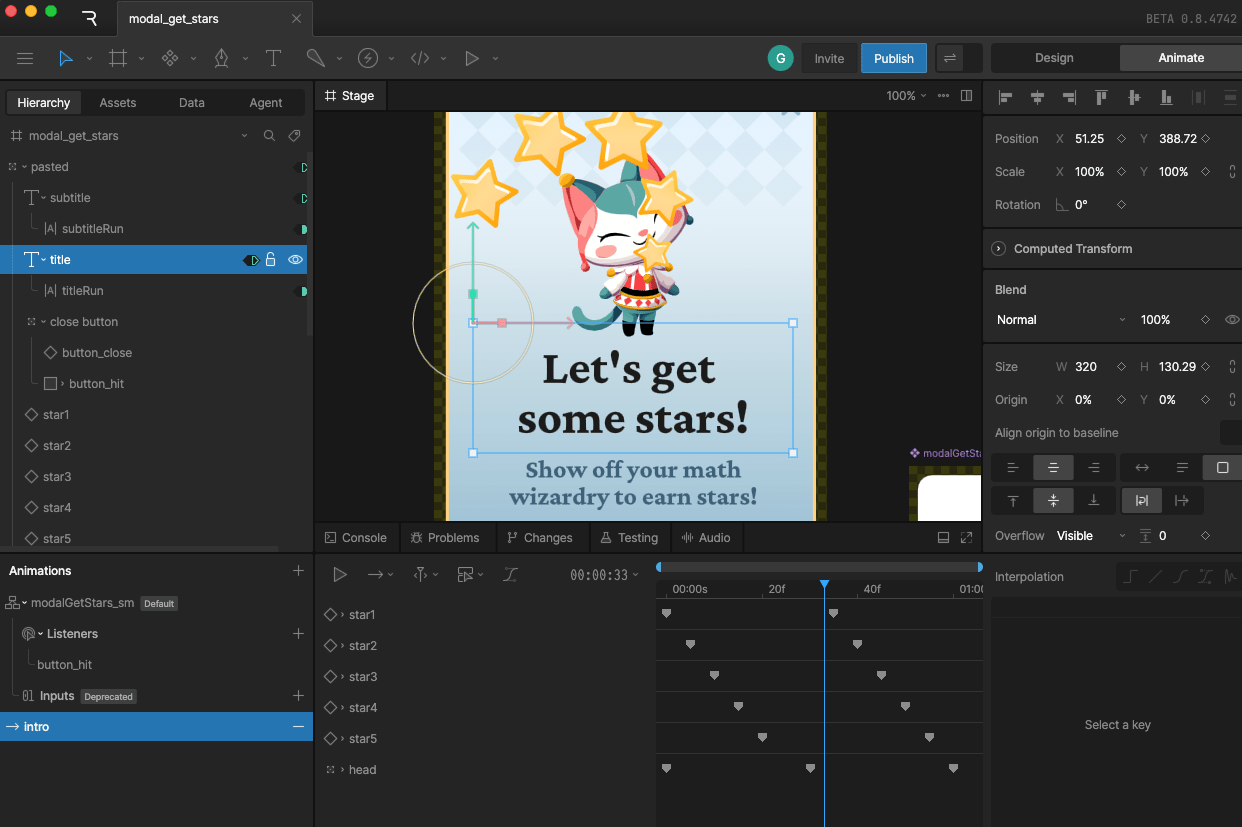
From Figma to playable prototype in under 2 hours
Development
My first build using Claude Code was a prototype of the core game experience - the lesson screen. Using the Figma MCP, I was able to have Claude build a functioning prototype in less than an hour. Once I could play the experience, I iterated rapidly on the design and tested many variations on the mechanics. My daughter playtested each iteration, giving immediate feedback on what felt fun versus frustrating.
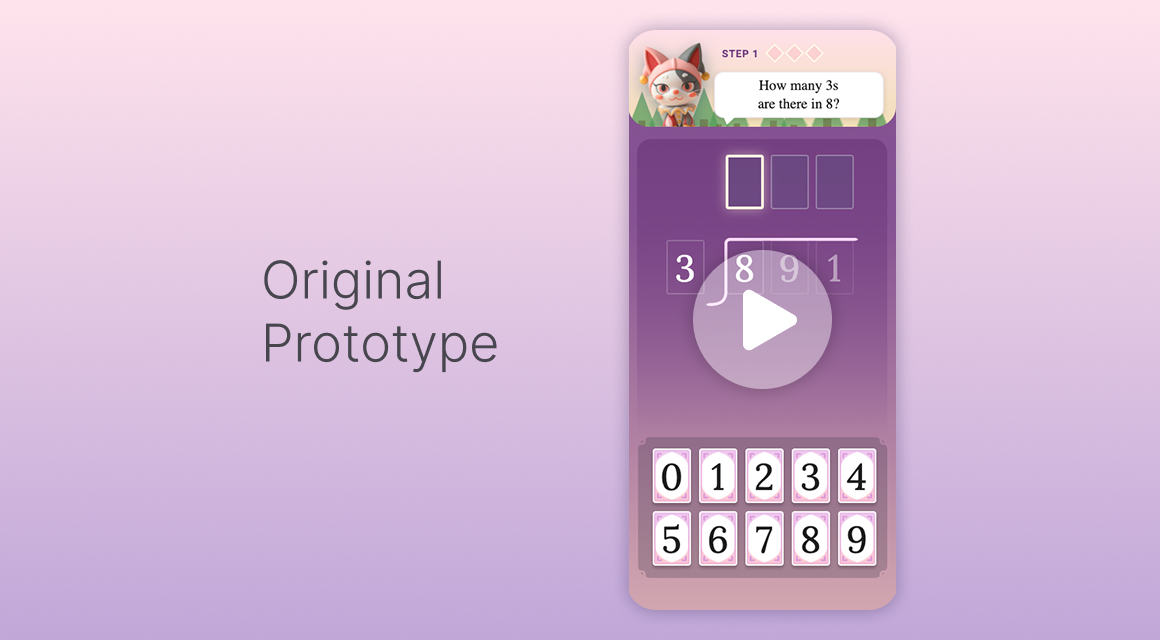
This experience was perfect for prototyping, however this ad-hoc approach didn’t form the strongest foundation for continued development. After 10+ rapid iterations, I had validated the core mechanic—but the ad-hoc code architecture wouldn't scale. Time to rebuild properly.
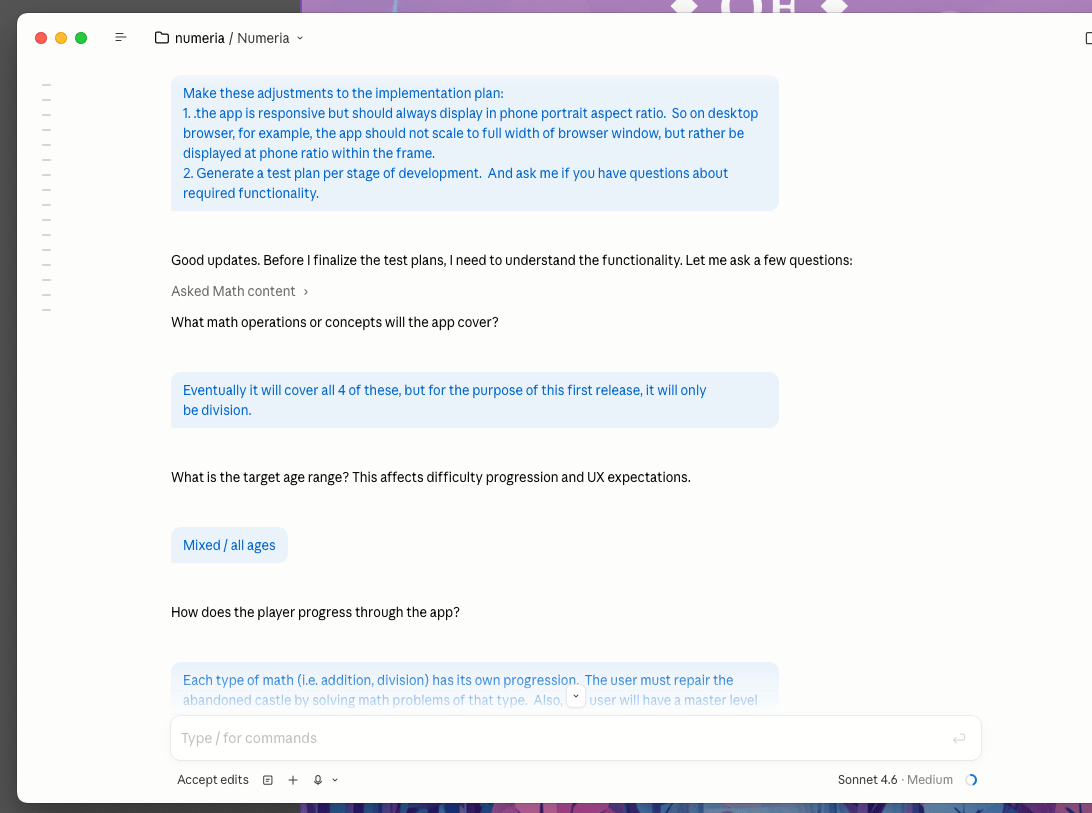
One of Claude Code’s most powerful features is its Plan Mode. I invested one full day in structured planning with Claude Code's Plan Mode—defining tech stack, edge cases, and a multi-stage implementation plan: first bare-bones functionality, then content and polish, finally animation and reward systems. This eliminated the costly rewrites typical of rapid prototyping.
This rapid workflow allowed me to get a fully functional build that met all of my success criteria live in days, with added systems and visual polish coming online within a week.
Validation & Iteration
What Drove Engagement:
- Repair mechanic: Created clear sense of progress; my kid could see their learning impact
- Character animations: Emotional connection sustained engagement across sessions
- Adaptive difficulty: Prevented frustration quit-outs by matching challenge to skill level
What Didn’t Work:
- Time pressure: Early prototypes used a timer, creating pressure that triggered math anxiety. I removed it in favor of untimed practice—sessions became 40% longer
Next Steps:
- Expand curriculum: Expanding beyond division to multiplication, fractions, word problems
- Parent dashboard: Build gatekeeper trust with weekly progress emails showing skill mastery (planned)
- Scalability: Exploring AI image generation to scale castle creation without artist bottleneck
Key Learnings
On AI-Assisted Product Development:
- AI tools enable solo designers to ship production apps, but success requires treating AI as a junior engineer—you must architect, review, and guide, not just prompt and hope. For example, Claude would enthusiastically generate complex features I didn't ask for—I learned to write tight specifications and review every output before integration.
- The 80/20 rule applies: AI handled 80% of implementation in 20% of the time, but the final 20% of polish still required human craft and judgment
On Designing for Kids:
- Positive feedback loops matter more than rewards—my daughter cared more about the cat's celebration than earning coins
- "Fun" isn't about features—it's about moment-to-moment feel. Animation quality drove more engagement than content variety
On Learning Math:
- Breaking problems into AI-generated scaffolded steps reduced math anxiety compared to all-or-nothing problem presentation
- Role reversal (kid as teacher) created ownership and pride in knowledge
- Progress visualization (castle repairs) made abstract math concepts concrete and rewarding




WIZARDS OF NUMERIA
Building a Kids Math Game in One Week
My Role
Product Designer
Engineer
Tools
Claude Code
Rive
Figma
Midjourney
Timeframe
Prototype: 2 hours
Release: 1 week
How do you make math fun for kids?
As a parent watching my own child struggle with math homework—tears, frustration, refusal—I evaluated every educational app on the market. I saw an opportunity to create an experience optimized for our specific needs: adaptive difficulty tailored to individual progress, game mechanics that feel like play rather than practice, and a parent-friendly approach to monetization.
So I built a new solution in one week, using AI tools to move from concept to working prototype at a speed impossible with traditional development.
The Result
In one week, I shipped a working game that transformed math from daily battle to requested activity:
- 50+ problems completed voluntarily in the first month (previously: fights over 10-minute homework sessions)
- 18-minute average session time 3x longer than typical educational app engagement
- Zero parent nagging required
Play It Yourself
My Role: Solo Designer-Developer
I handled end-to-end product development—research, design, animation, and development—leveraging AI tools to compress what would typically be a 3-month, multi-person effort into a one-week solo sprint.
Tool Stack:
- Design & Iteration: Figma (interface design) + Figma MCP (rapid prototyping with Claude)
- Development: Claude Code (from planning to production code)
- Visual Assets: Midjourney (concepting) → Recraft (vectorization)
- Animation: Rive (interactive character & UI animations)
While I've shipped products with engineering teams for years, this was my first time writing production code—proving that AI tools have fundamentally changed what individual designers can accomplish.
Design principles that guided every decision
Through observing my own kid and analyzing competitor apps, I identified four non-negotiables:
Positive Reinforcement Over Penalties
Math anxiety is real. Every interaction needed to feel supportive, not punitive. I chose to break down complex problems into smaller, easy-to-digest stages with praise at every step.
Parent-Friendly Monetization
No predatory IAPs or chat features. Designed for a subscription model parents could trust. When parents trust the educational value, they grant longer play sessions and encourage daily use—I designed for trust from day one.
AI-Powered Adaptive Difficulty
Unlike static apps, I wanted the game to adapt to each child’s skill level based on how they were performing. I built a custom Claude Code Skill that tracks player success rates and dynamically adjusts problem difficulty in real-time.
Fun First
If it felt like homework, I'd failed. So I applied game development principles: tight feedback loops, celebration moments, and smooth animations that make every tap feel responsive and rewarding.
The Solution
I selected the setting of a medieval magical kingdom because I knew it had broad appeal with kids from countless successful books and films - and I also thought it offered great opportunities for fun magical moments.
To create the supportive environment kids need, I flipped the traditional education dynamic: instead of being students who "don't know enough," players become math wizards teaching a kingdom that's forgotten its skills. This role reversal transforms math from a subject they're struggling with into knowledge they proudly share.
The repair mechanic (inspired by games like Gardenscapes) made learning progress visually concrete—every solved problem restored part of the castle, turning abstract math practice into tangible accomplishment.
To make difficulty truly adaptive, I designed a system where Claude Code dynamically generates multi-step problems based on the child's performance—breaking complex division into manageable chunks and increasing complexity when they're ready for a challenge.
Bringing it to life
The power of characters
I knew I wanted an animated host character to provide an emotional connection. I started with Japanese collectible figure aesthetics—approachable, cute, with personality that reads clearly at small sizes. And I chose a cat because of their clever nature and broad appeal - with a jester costume to fit into the medieval theme and for added cuteness.
For initial ideation, I used Midjourney to rapidly explore concepts, and after many variations I arrived at a character design that I really liked. I even generated some initial animations of the character. Testing revealed the dark, rendered style clashed with the bright, playful UI—kids respond better to high-contrast, cheerful palettes. This insight drove the pivot to vector style.
This led me to explore a more vector style, which had the benefit of smaller file sizes and could be created with transparent backgrounds - something Midjourney didn’t support. First, I modified the character in Midjourney to adjust the style, then I vectorized the tool in Recraft, which had the best vectorization capability that I tested.
I designed for accessibility from the start: high-contrast colors, large touch targets (60px minimum), and audio cues for correct answers to support diverse learning needs.
Animation
Now it was time to animate the UI and the character. Many of the AI-based animation tools on the market only output video, which wouldn’t work for my purposes since I wanted lightweight javascript-based animations.
That led me to evaluate Jitter, Lottie and Rive. I ended up choosing Rive because of its ease of use and support for interactive animations—giving me the potential for the cat to respond to touch, creating moments of delight that kept kids engaged between problems.
To streamline development, I created reusable Claude Code Skills for Rive integration and particle effects—allowing me to add celebration moments throughout the app without repetitive coding.
From Figma to playable prototype in under 2 hours
Development
My first build using Claude Code was a prototype of the core game experience - the lesson screen. Using the Figma MCP, I was able to have Claude build a functioning prototype in less than an hour. Once I could play the experience, I iterated rapidly on the design and tested many variations on the mechanics. My daughter playtested each iteration, giving immediate feedback on what felt fun versus frustrating.
This experience was perfect for prototyping, however this ad-hoc approach didn’t form the strongest foundation for continued development. After 10+ rapid iterations, I had validated the core mechanic—but the ad-hoc code architecture wouldn't scale. Time to rebuild properly.
One of Claude Code’s most powerful features is its Plan Mode. I invested one full day in structured planning with Claude Code's Plan Mode—defining tech stack, edge cases, and a multi-stage implementation plan: first bare-bones functionality, then content and polish, finally animation and reward systems. This eliminated the costly rewrites typical of rapid prototyping.
This rapid workflow allowed me to get a fully functional build that met all of my success criteria live in days, with added systems and visual polish coming online within a week.
Validation & Iteration
What Drove Engagement:
- Repair mechanic: Created clear sense of progress; my kid could see their learning impact
- Character animations: Emotional connection sustained engagement across sessions
- Adaptive difficulty: Prevented frustration quit-outs by matching challenge to skill level
What Didn’t Work:
- Time pressure: Early prototypes used a timer, creating pressure that triggered math anxiety. I removed it in favor of untimed practice—sessions became 40% longer
Next Steps:
- Expand curriculum: Expanding beyond division to multiplication, fractions, word problems
- Parent dashboard: Build gatekeeper trust with weekly progress emails showing skill mastery (planned)
- Scalability: Exploring AI image generation to scale castle creation without artist bottleneck
Key Learnings
On AI-Assisted Product Development:
- AI tools enable solo designers to ship production apps, but success requires treating AI as a junior engineer—you must architect, review, and guide, not just prompt and hope. For example, Claude would enthusiastically generate complex features I didn't ask for—I learned to write tight specifications and review every output before integration.
- The 80/20 rule applies: AI handled 80% of implementation in 20% of the time, but the final 20% of polish still required human craft and judgment
On Designing for Kids:
- Positive feedback loops matter more than rewards—my daughter cared more about the cat's celebration than earning coins
- "Fun" isn't about features—it's about moment-to-moment feel. Animation quality drove more engagement than content variety
On Learning Math:
- Breaking problems into AI-generated scaffolded steps reduced math anxiety compared to all-or-nothing problem presentation
- Role reversal (kid as teacher) created ownership and pride in knowledge
- Progress visualization (castle repairs) made abstract math concepts concrete and rewarding


WIZARDS OF NUMERIA
Building a Kids Math Game in One Week
My Role
Product Designer
Engineer
Tools
Claude Code
Rive
Figma
Midjourney
Timeframe
Prototype: 2 hours
Release: 1 week
How do you make math fun for kids?
As a parent watching my own child struggle with math homework—tears, frustration, refusal—I evaluated every educational app on the market. I saw an opportunity to create an experience optimized for our specific needs: adaptive difficulty tailored to individual progress, game mechanics that feel like play rather than practice, and a parent-friendly approach to monetization.
So I built a new solution in one week, using AI tools to move from concept to working prototype at a speed impossible with traditional development.
The Result
In one week, I shipped a working game that transformed math from daily battle to requested activity:
- 50+ problems completed voluntarily in the first month (previously: fights over 10-minute homework sessions)
- 18-minute average session time 3x longer than typical educational app engagement
- Zero parent nagging required
Play It Yourself
My Role: Solo Designer-Developer
I handled end-to-end product development—research, design, animation, and development—leveraging AI tools to compress what would typically be a 3-month, multi-person effort into a one-week solo sprint.
Tool Stack:
- Design & Iteration: Figma (interface design) + Figma MCP (rapid prototyping with Claude)
- Development: Claude Code (from planning to production code)
- Visual Assets: Midjourney (concepting) → Recraft (vectorization)
- Animation: Rive (interactive character & UI animations)
While I've shipped products with engineering teams for years, this was my first time writing production code—proving that AI tools have fundamentally changed what individual designers can accomplish.
Design principles that guided every decision
Through observing my own kid and analyzing competitor apps, I identified four non-negotiables:
Positive Reinforcement Over Penalties
Math anxiety is real. Every interaction needed to feel supportive, not punitive. I chose to break down complex problems into smaller, easy-to-digest stages with praise at every step.
Parent-Friendly Monetization
No predatory IAPs or chat features. Designed for a subscription model parents could trust. When parents trust the educational value, they grant longer play sessions and encourage daily use—I designed for trust from day one.
AI-Powered Adaptive Difficulty
Unlike static apps, I wanted the game to adapt to each child’s skill level based on how they were performing. I built a custom Claude Code Skill that tracks player success rates and dynamically adjusts problem difficulty in real-time.
Fun First
If it felt like homework, I'd failed. So I applied game development principles: tight feedback loops, celebration moments, and smooth animations that make every tap feel responsive and rewarding.
The Solution
I selected the setting of a medieval magical kingdom because I knew it had broad appeal with kids from countless successful books and films - and I also thought it offered great opportunities for fun magical moments.
To create the supportive environment kids need, I flipped the traditional education dynamic: instead of being students who "don't know enough," players become math wizards teaching a kingdom that's forgotten its skills. This role reversal transforms math from a subject they're struggling with into knowledge they proudly share.
The repair mechanic (inspired by games like Gardenscapes) made learning progress visually concrete—every solved problem restored part of the castle, turning abstract math practice into tangible accomplishment.
To make difficulty truly adaptive, I designed a system where Claude Code dynamically generates multi-step problems based on the child's performance—breaking complex division into manageable chunks and increasing complexity when they're ready for a challenge.
Bringing it to life
The power of characters
I knew I wanted an animated host character to provide an emotional connection. I started with Japanese collectible figure aesthetics—approachable, cute, with personality that reads clearly at small sizes. And I chose a cat because of their clever nature and broad appeal - with a jester costume to fit into the medieval theme and for added cuteness.
For initial ideation, I used Midjourney to rapidly explore concepts, and after many variations I arrived at a character design that I really liked. I even generated some initial animations of the character. Testing revealed the dark, rendered style clashed with the bright, playful UI—kids respond better to high-contrast, cheerful palettes. This insight drove the pivot to vector style.
This led me to explore a more vector style, which had the benefit of smaller file sizes and could be created with transparent backgrounds - something Midjourney didn’t support. First, I modified the character in Midjourney to adjust the style, then I vectorized the tool in Recraft, which had the best vectorization capability that I tested.
I designed for accessibility from the start: high-contrast colors, large touch targets (60px minimum), and audio cues for correct answers to support diverse learning needs.
Animation
Now it was time to animate the UI and the character. Many of the AI-based animation tools on the market only output video, which wouldn’t work for my purposes since I wanted lightweight javascript-based animations.
That led me to evaluate Jitter, Lottie and Rive. I ended up choosing Rive because of its ease of use and support for interactive animations—giving me the potential for the cat to respond to touch, creating moments of delight that kept kids engaged between problems.
To streamline development, I created reusable Claude Code Skills for Rive integration and particle effects—allowing me to add celebration moments throughout the app without repetitive coding.
From Figma to playable prototype in under 2 hours
Development
My first build using Claude Code was a prototype of the core game experience - the lesson screen. Using the Figma MCP, I was able to have Claude build a functioning prototype in less than an hour. Once I could play the experience, I iterated rapidly on the design and tested many variations on the mechanics. My daughter playtested each iteration, giving immediate feedback on what felt fun versus frustrating.
This experience was perfect for prototyping, however this ad-hoc approach didn’t form the strongest foundation for continued development. After 10+ rapid iterations, I had validated the core mechanic—but the ad-hoc code architecture wouldn't scale. Time to rebuild properly.
One of Claude Code’s most powerful features is its Plan Mode. I invested one full day in structured planning with Claude Code's Plan Mode—defining tech stack, edge cases, and a multi-stage implementation plan: first bare-bones functionality, then content and polish, finally animation and reward systems. This eliminated the costly rewrites typical of rapid prototyping.
This rapid workflow allowed me to get a fully functional build that met all of my success criteria live in days, with added systems and visual polish coming online within a week.
Validation & Iteration
What Drove Engagement:
- Repair mechanic: Created clear sense of progress; my kid could see their learning impact
- Character animations: Emotional connection sustained engagement across sessions
- Adaptive difficulty: Prevented frustration quit-outs by matching challenge to skill level
What Didn’t Work:
- Time pressure: Early prototypes used a timer, creating pressure that triggered math anxiety. I removed it in favor of untimed practice—sessions became 40% longer
Next Steps:
- Expand curriculum: Expanding beyond division to multiplication, fractions, word problems
- Parent dashboard: Build gatekeeper trust with weekly progress emails showing skill mastery (planned)
- Scalability: Exploring AI image generation to scale castle creation without artist bottleneck
Key Learnings
On AI-Assisted Product Development:
- AI tools enable solo designers to ship production apps, but success requires treating AI as a junior engineer—you must architect, review, and guide, not just prompt and hope. For example, Claude would enthusiastically generate complex features I didn't ask for—I learned to write tight specifications and review every output before integration.
- The 80/20 rule applies: AI handled 80% of implementation in 20% of the time, but the final 20% of polish still required human craft and judgment
On Designing for Kids:
- Positive feedback loops matter more than rewards—my daughter cared more about the cat's celebration than earning coins
- "Fun" isn't about features—it's about moment-to-moment feel. Animation quality drove more engagement than content variety
On Learning Math:
- Breaking problems into AI-generated scaffolded steps reduced math anxiety compared to all-or-nothing problem presentation
- Role reversal (kid as teacher) created ownership and pride in knowledge
- Progress visualization (castle repairs) made abstract math concepts concrete and rewarding